
That question sits underneath the September 2026 Adobe Analytics updates. Adobe did not release one headline feature that changes everything this month. Instead, September brought a series of technical changes across segmentation, bot detection, Classification Sets and the Analytics 2.0 API. Look at them together, however, and a larger shift emerges: analytics value increasingly depends on what happens before the dashboard and what happens after the insight.
A number can be technically accurate and still lead to the wrong marketing decision. A segment can be configured correctly but answer the wrong question. Traffic can be collected correctly but contain patterns the business has not properly understood. Campaign values can be technically valid but classified differently across systems. An API can work perfectly while quietly supporting processes nobody has documented.
That creates an important distinction:

The paradox is that the more sophisticated the MarTech stack becomes, the harder this problem can be to see. More platforms create more connections. More connections create more dependencies. And more dependencies create more opportunities for context to disappear between collection and activation.
This is why the Adobe Analytics September 2026 updates are more interesting when viewed as part of a larger architecture.
At Devrun, that architecture can be understood through the:
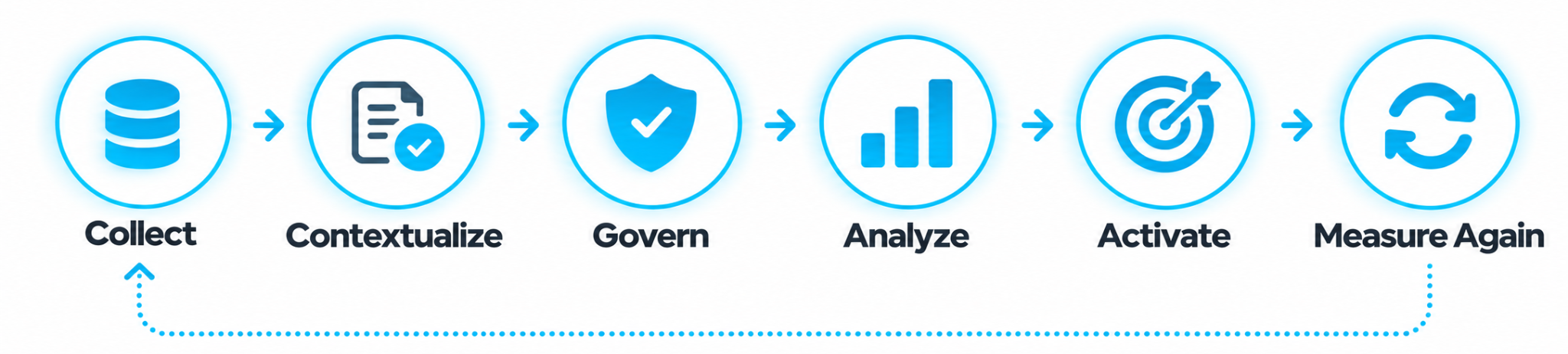
The objective is not simply to produce a better report. It is to preserve trust as a signal travels through the MarTech stack.
Consider a report covering September 1 to September 15. A Visitor-level segment can contain date components that cause Workspace results to extend beyond the report's date range. Adobe's September update introduces an option to limit segment results to the reporting period, regardless of the date components inside the segment. The capability became generally available September 9.
Technically, this is a segmentation improvement. From a marketing perspective, it is a context-control mechanism.
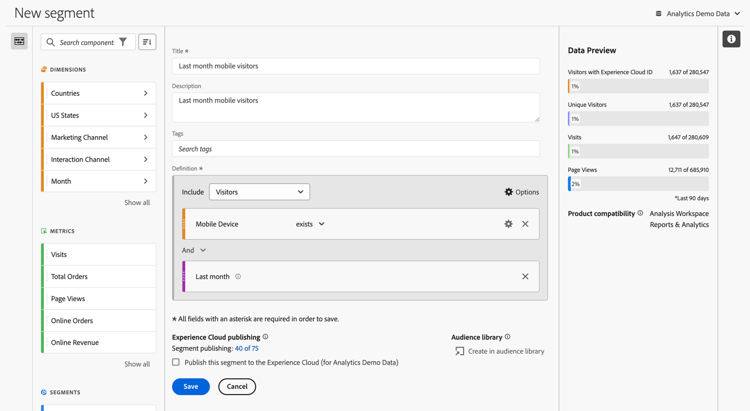
Adobe Analytics Segment Builder shows how Visitor, Visit and Hit containers shape the context of an analysis.
Imagine comparing two campaigns and discovering that one audience has a higher conversion rate. Before moving the budget, the obvious question is not only whether the calculation is correct. It is whether both audiences are being evaluated within the same analytical context.
That changes how segmentation should be reviewed. The question is no longer only “Is the segment correct?” but; “Is the segment answering the business question I think it is answering?”
The Adobe Analytics update moves even closer to the collection layer. For implementations using Edge Data Collection with Web SDK, Adobe introduced changes to bot detection that allow custom bot rules to identify traffic exceptions that might otherwise be treated as bot-generated. Custom rules now run before IAB bot detection rules. Adobe notes that bot scores are not affected, although rule names associated with events may change. The update applies to Web SDK-based Edge implementations, not older AppMeasurement implementations.
For a developer, this is an implementation detail. For a Marketing Director, it can become a measurement problem. A sudden traffic increase is often investigated through campaigns, channels or landing pages. But if the organization cannot explain what traffic is being filtered, classified or allowed through the collection layer, the dashboard may be answering a question the business did not intend to ask.
This is where Web SDK, Edge Data Collection and analytics governance stop being separate technical conversations.
Analytics data rarely arrives with business meaning attached. A campaign ID is technical. A product code is technical. A content identifier is technical.
Classification Sets turn changing technical values into structured business meaning.
Adobe's Classification Sets provide a unified interface for managing classifications and rules, and September brought updated Classification Sets API endpoints and parameters, with general availability on September 30. Classification sounds administrative until the same campaign starts appearing under different business definitions.
If one system calls a campaign “Paid Social,” another calls it “Social Acquisition,” and a third groups it under a broader media category, the technology may be functioning perfectly while the organization loses consistency. That is why analytics governance is increasingly part of MarTech simplicity. Complexity does not always come from having too many platforms. Sometimes it comes from giving the same data different meanings.
September also added guidance around encoding date itemId parameters in Adobe Analytics 2.0 API date-trended reports. Adobe specifically connects the guidance to configuring and migrating services from the deprecated 1.4 APIs.
It may look like developer documentation. It is actually an excellent opportunity to ask a larger enterprise question: Where does Adobe Analytics data go after it leaves Analysis Workspace?
Custom dashboards, automated reports, data pipelines and internal applications can quietly depend on Analytics APIs for years. When migration becomes necessary, organizations can discover that their most important analytics dependencies are also their least documented. Modernizing Analytics therefore means more than modernizing the interface.
Before implementing every new feature, ask five questions.
This is not an industry maturity benchmark. It is a practical diagnostic. If several answers raise concerns, the problem may not be a missing dashboard or a missing Adobe feature. The problem may sit somewhere in the chain connecting data to decision.
The answer is not to activate every September feature immediately. Start with one high-value segment, one major traffic source, one classification structure and one downstream analytics dependency. Follow each signal through the architecture and ask where context changes, where ownership becomes unclear and where the insight stops moving.
That exercise can reveal more than another dashboard review because it exposes the gaps between technologies — precisely where enterprise MarTech complexity tends to accumulate. And there is a useful rule to keep in mind:
If the signal cannot travel safely through the stack, adding more intelligence to the stack will not solve the problem.
This is where the story moves beyond Analytics. Adobe Experience Platform's September release introduced conversational data-management and data-validation capabilities through CX Enterprise Coworker, while Adobe Target's September 30 release introduced beta AI Insights for A/B Tests with manual traffic allocation. Once an experiment reaches statistical significance, AI Insights can highlight attributes associated with the winning experience and suggest opportunities, hypotheses and implementation guidance.
The direction is becoming clear:
That is the natural continuation of Devrun's Adobe Analytics August 2026: From Signals to Action, which explored the shortening distance between seeing a signal and acting on it. The September Martech updates adds another condition: The signal has to be trustworthy before it can become actionable.
The most important September Adobe Analytics update may therefore not be a single feature. It is the pattern. Adobe is strengthening the connections between collection, context, governance, analysis and activation. For marketing organizations, this changes the conversation from “Do we have the right analytics tools?” to something more uncomfortable:
Can our MarTech architecture preserve meaning from the moment data is collected to the moment a marketing decision is measured?
The September test is simple: Can your organization take one trustworthy Adobe Analytics signal, preserve its context, activate it in the right place, and measure the outcome without losing meaning along the way? If the answer is no, the next optimization may not be another dashboard. It may be the measurement architecture itself.
That is the real story behind the Adobe Analytics September 2026 updates. The future of enterprise analytics is not simply more data, more dashboards or more AI. It is the ability to turn trusted data into meaningful MarTech insights, meaningful insights into action, and action into measurable business outcomes.